Link to Look Up Tool: Click Here
Link to Mapping Files: Click Here
Link to Craft/Cost Code Mapping: Click Here
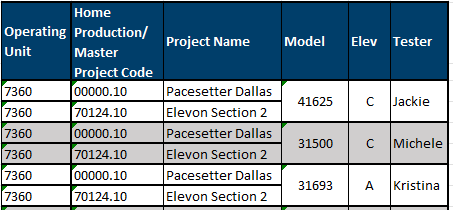
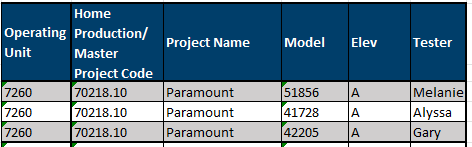
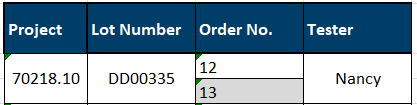
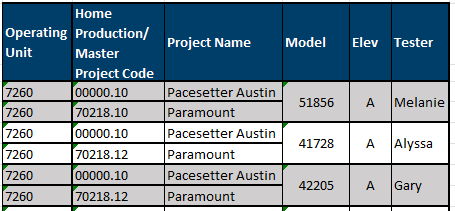
The table below indicates the data to utilize for each test case, where necessary.
If a test case does not have a data item, please choose one at your discretion.
|
Pacesetter - Austin Operating Unit: 7260 |
||||
|
Test Case |
Data Information | |||
|
Project: 70218.10 - Paramount | |||
|
3. Model Subcontracts |
 |
|||
|
4. Products |
Product Library: 7260 |
|||
|
5. Sales & Take Offs |
*Please ensure to add different quantities etc. to the master project and home production sales and takeoffs so they are not the same. Please do not process apply master project.
|
|||
|
6. Select PO Supplier |
 |
|||
|
7.1. PO Processing - New PO
|
 |
|||
|
7.2. PO Processing - New VPO |
 |
|||
|
7.3. PO Processing - PO Change Order |
 |
|||
|
7.4. PO Processing - Void PO |
 |
|||
|
8. Custom Options |
|
|||
|
10. Lot Estimate 11. Selling Budget |
Project: 70218.10 - Paramount Lot: DD00298 |
|||
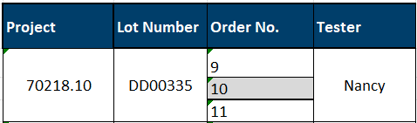
|
Pacesetter - Dallas Operating Unit: 7360 |
|||
| Test Case | Data Information | ||
|
|
||
| 3. Model Subcontracts | 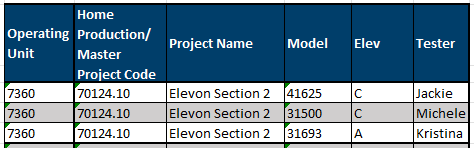 |
||
| 4. Products |
Product Library: 7360 |
||
| 5. Sales & Take-off |
*Please ensure to add different quantities etc. to the master project and home production sales and takeoffs so they are not the same. Please do not process apply master project.
|
||
| 6. Select PO Supplier |
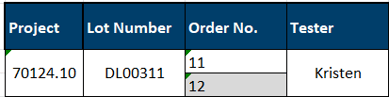 |
||
|
7.1. PO Processing - New PO |
 |
||
|
7.2. PO Processing - New VPO |
 |
||
| 7.3. PO Processing - PO Change Order |
|
||
| 7.4. PO Processing - Void PO |  |
||
| 8. Custom Options | 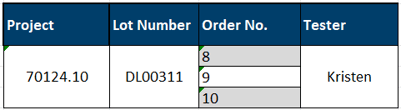 |
||